Direct Keystroke Sequences Across All Calculator Hardware
The exact steps to calculate a square root depend entirely on whether your calculator utilizes immediate execution logic or Direct Algebraic Logic (D.A.L. / V.P.A.M.):
Number First, Then Root
- Clear screen (AC or C).
- Enter the target number (e.g.,
144). - Press the radical symbol key (√).
- The result (
12) displays instantly. Do not press equals.
Root First, Then Number
- Press the radical key (√).
- Enter the target number (e.g.,
144). - Close the bracket ) if prompted.
- Press ENTER or = to compute.
Rotate to Landscape
- Unlock portrait orientation and rotate phone landscape.
- On iOS, type the number first, then press ²√x.
- On Google Android, press √, enter number, and press =.

Calculating Cube Roots and Higher-Order nth Roots
When solving cubic geometry or compound financial interest, you frequently encounter cube roots (∛) or arbitrary nth-roots (ⁿ√). Every root can be mathematically evaluated using the fundamental rule of fractional exponents:
// The Law of Rational Exponents
ⁿ√x = x^(1 / n)
If your calculator lacks a dedicated radical key for higher roots, use the exponential caret key (^ or xʸ). For example, to calculate the 5th root of 3,125: type 3125, press ^, open parentheses (, enter 1 / 5, close parentheses ), and press =. The engine evaluates 3,125^0.2 = 5.00.
Solve Advanced Radicals with BentoQuilt
Execute square roots, cube roots, trigonometric functions, and complex algebraic radicals with our high-precision scientific engine.
Manual Approximation: The Babylonian Algorithm
Before digital circuits existed, architects and surveyors calculated precise square roots by hand utilizing the Babylonian iteration (a special case of the Newton-Raphson method). The recurrence formula is defined as:
x_(n+1) = 0.5 × (x_n + S / x_n)
Where S is the number whose square root is sought, and x_0 is an initial educated estimate.
Suppose you require the square root of S = 54 in a remote field environment without a calculator:
- Initial Guess (x_0): Identify the nearest perfect square. Since 7² = 49 and 8² = 64, select
x_0 = 7.0. - Iteration 1: x_1 = 0.5 × (7 + 54 / 7) = 0.5 × (7 + 7.7143) = 7.3571. Note that (7.3571)² = 54.126.
- Iteration 2: x_2 = 0.5 × (7.3571 + 54 / 7.3571) = 0.5 × (7.3571 + 7.3398) = 7.3484. Note that (7.3484)² = 53.9989.
Within merely two pencil-and-paper iterations, the result is accurate to four significant decimal places.
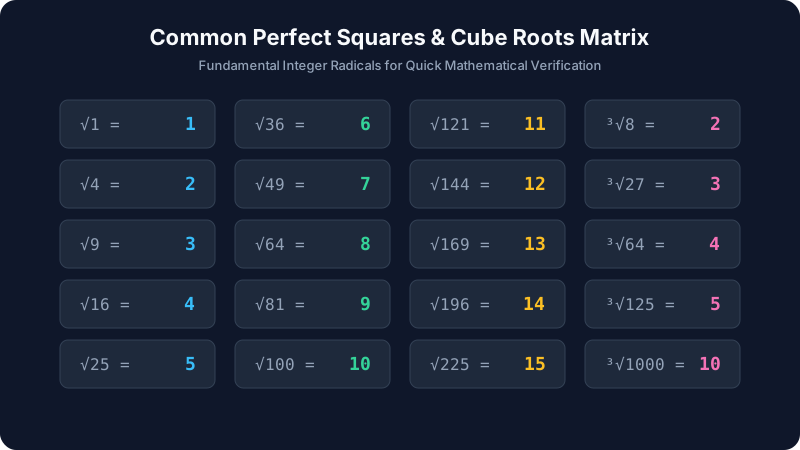
Applied Engineering Case Studies: Diagonal Bracing & RMS Voltage
Case Study 1: Structural Timber Diagonal Bracing (Pythagorean Theorem)
A civil carpenter is framing an earthquake shear wall measuring 3.6 meters in width and 2.7 meters in height. The diagonal brace hypotenuse length (c) requires computing the square root of the sum of squares: c = √(a² + b²).
a² = 3.6² = 12.96 m²
b² = 2.7² = 7.29 m²
a² + b² = 20.25 m²
c = √(20.25) = 4.500 meters exactly
Case Study 2: Electrical Engineering Root-Mean-Square (RMS) Calculation
An electrical engineer tests an AC power generator producing a peak sinusoidal voltage (V_peak) of 339.41 Volts. Calculating effective household mains voltage requires dividing peak voltage by the square root of 2: V_rms = V_peak / √2. By evaluating √2 ≈ 1.41421, the resulting effective output is 339.41 / 1.41421 = 240.00 Volts RMS, conforming with UK and Australian mains power specifications.
Quick Hardware Reference Table: Keystroke Lookup
| Device Model | Key Label | Keystroke Order | Closing Bracket Needed? |
|---|---|---|---|
| Apple iPhone (Landscape) | ²√x | Number → Key | No |
| Texas Instruments TI-84 Plus | 2nd → [√] | Key → Number → Enter | Recommended |
| Casio fx-991EX ClassWiz | √▢ | Key → Number → = | No (Auto-box) |
| Standard 4-Function Desktop | √ | Number → Key | No |
Resolving Calculator 'Domain Error' and Negative Radicals
If your calculator displays Domain Error, Math Error, or NaN when pressing the root key, you have attempted to evaluate the square root of a negative real number. In real number arithmetic, no real number multiplied by itself yields a negative product (since (+)(+) = + and (-)(-) = +). Evaluating roots of negative numbers requires switching your scientific calculator into Complex Mode (a + bi), where √(-1) is recognized as the imaginary unit i.