Top 5 HMRC Self Assessment Online Calculator Errors & System Failures
During peak filing periods leading up to the January 31 midnight deadline, the HMRC online portal processes over 100,000 returns daily. The most frequent system failures include:
Error 1 'We Cannot Calculate Your Tax at This Time'
Occurs when the HMRC calculation engine encounters contradictory data between your self-employment pages (SA103) and partnership schedules (SA104), or when capital allowances claim entries exceed turnover.
Error 2 'Submission Failure: 6594 or 6492 Schema Validation Error'
Caused by hidden characters, invalid currency formatting (such as pasting commas or currency signs into plain numeric fields), or special characters (&, <, >) in white-space notes boxes.
Error 3 Student Loan Repayment Double-Counting
Occurs when taxpayers with both employment (PAYE P60) and freelance income have student loan deductions taken at source, but the HMRC calculator fails to credit the PAYE student loan repayments, demanding the full 9% deduction again.
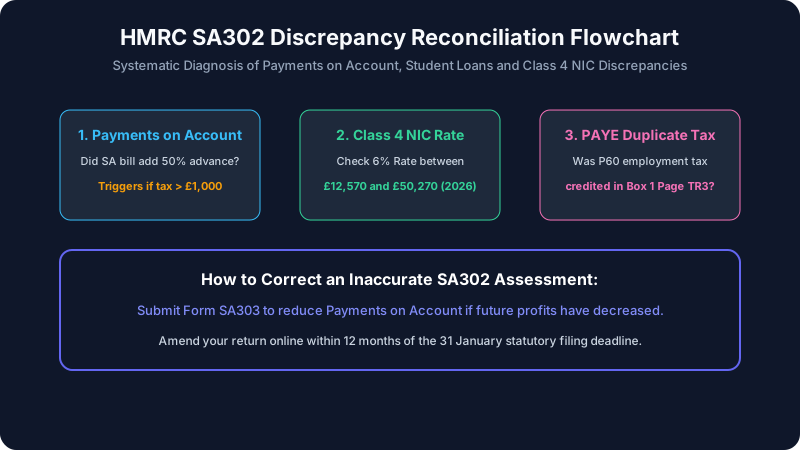
The 'Payments on Account' Surprise: Why Your Bill is 50% Higher
The single most alarming surprise for newly self-employed individuals is that the HMRC calculator adds an extra 50% advance payment onto their tax liability:
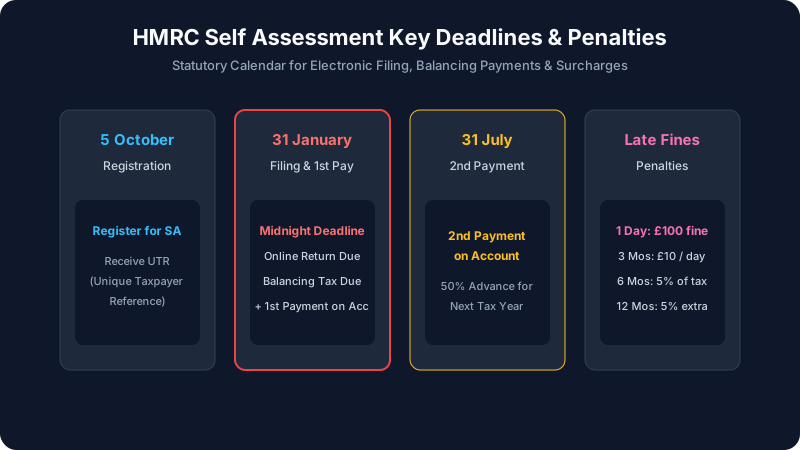
Total Due on January 31 = Balancing Tax for Prior Year + 50% First Payment on Account for Next Year
Second Payment on Account (remaining 50%) is due on July 31.
If your calculated income tax and Class 4 NIC totals £6,000, HMRC expects £6,000 for the prior year PLUS a £3,000 advance payment for next year, requiring £9,000 on January 31. You are exempt from Payments on Account ONLY if:
- Your total tax and NIC bill is less than £1,000; or
- More than 80% of your total tax was already deducted at source (e.g. through your PAYE employment salary).
If your trading profits have collapsed in the current tax year, you have the statutory legal right to submit form SA303 (Claim to Reduce Payments on Account) directly within the online return to lower this figure.
Independent UK Tax Verification with BentoQuilt
Calculate your true trading profits, allowable expenses, and corporation tax liability independently before submitting your return.
Step-by-Step Technical Fix Protocol for Government Gateway
If the HMRC online calculator freezes, displays blank white screens, or rejects your inputs, follow this technical resolution checklist:
- Purge HMRC Cookies & Local Storage: Clear browser cache specifically for
tax.service.gov.uk. Expired authentication tokens are the #1 cause of calculation loops. - Disable Browser Auto-Fill & Extensions: Password managers (1Password, Bitwarden, LastPass) and Google Chrome auto-fill frequently inject invisible postal codes or telephone numbers into hidden numeric currency boxes.
- Switch to Private / Incognito Mode: Open an Incognito window in Mozilla Firefox or Microsoft Edge to run without cached script collisions.
- Audit Tailored Questions: Navigate backward to the 'Tailored Questions' section (Page 3). If you accidentally checked 'Yes' to receiving offshore trust dividends or complex foreign pensions, the portal triggers complex validation schedules that crash without secondary data.
- Check HMRC Service Availability Dashboard: HMRC regularly takes specific API endpoints offline for maintenance on Saturday nights and Sundays. Check the HMRC Service Availability and Issues page.
Manual Verification Case Studies: Sole Trader vs. Contractor
Case Study 1: Freelance Graphic Designer (£38,000 Net Trading Profit)
A sole trader inputs £48,000 turnover and £10,000 allowable business expenses. The HMRC calculator errors out on Class 4 NIC:
Net Trading Profit: £38,000.00
Personal Allowance: -£12,570.00 (Tax-free)
Taxable Income: £25,430.00 @ 20% Basic Rate = £5,086.00 Income Tax
Class 2 NIC: £0.00 (Treated as paid under Small Profits Threshold rules)
Class 4 NIC (6% on profits between £12,570 and £50,270): (£38,000 - £12,570) × 0.06 = £1,525.80
True Balancing Tax Liability = £5,086.00 + £1,525.80 = £6,611.80
First Payment on Account (50%) = £3,305.90
Total Payment Due January 31 = £9,917.70
HMRC Gateway Error Codes & Direct Solutions Matrix
| Error Message / Code | Root Cause | Immediate Corrective Action |
|---|---|---|
| Error 500 / Gateway Timeout | HMRC server capacity overload | Wait 30 minutes; save draft and retry in off-peak hours (before 8 AM or after 9 PM). |
| Error 1046: Authentication Failed | Incorrect UTR or Gateway User ID | Check that the 10-digit Unique Taxpayer Reference (UTR) matches your SA registration letter. |
| Schema Code 6594 | Special characters or formatting in text fields | Remove symbols (£, %, &, <, >) from all supplementary explanation boxes. |
| Student Loan Mismatch | Failure to reflect P60 PAYE deductions | Ensure box 1 in the Student Loan section includes total student loan deducted by your employer. |
Protecting Against Penalties: Claiming 'Reasonable Excuse'
Missing the January 31 filing deadline triggers an immediate non-negotiable £100 late filing penalty, even if you owe zero tax. However, under Section 118(2) of the Taxes Management Act 1970 (TMA 1970), taxpayers have statutory protection if prevented from filing by a 'Reasonable Excuse.' If the HMRC system crashes within 48 hours of the deadline, take immediate full-screen screenshots displaying the date, time, error code, and your 10-digit UTR. HMRC recognizes severe service outages on their own servers as a valid defense, provided you submit your return as soon as the service is restored.